How to: Create a Citation Spy Run
Start a competitor citation analysis, track its phases, and turn the final recommendations into an execution list.
Before you start
Citation Spy requires an active paid plan and a business with valid location data. The business profile is used as the context for competitor discovery and recommendation matching.
Open Citation Spy and choose a business
Go to Tools -> Citation Spy, select the business, and start the run. The same page also shows recent runs, so you can reopen previous results without searching through reports.

Track the run phases
Citation Spy progresses through three visible phases: finding competitors, analyzing domains, and matching business-fit recommendations.

Read the opportunity list
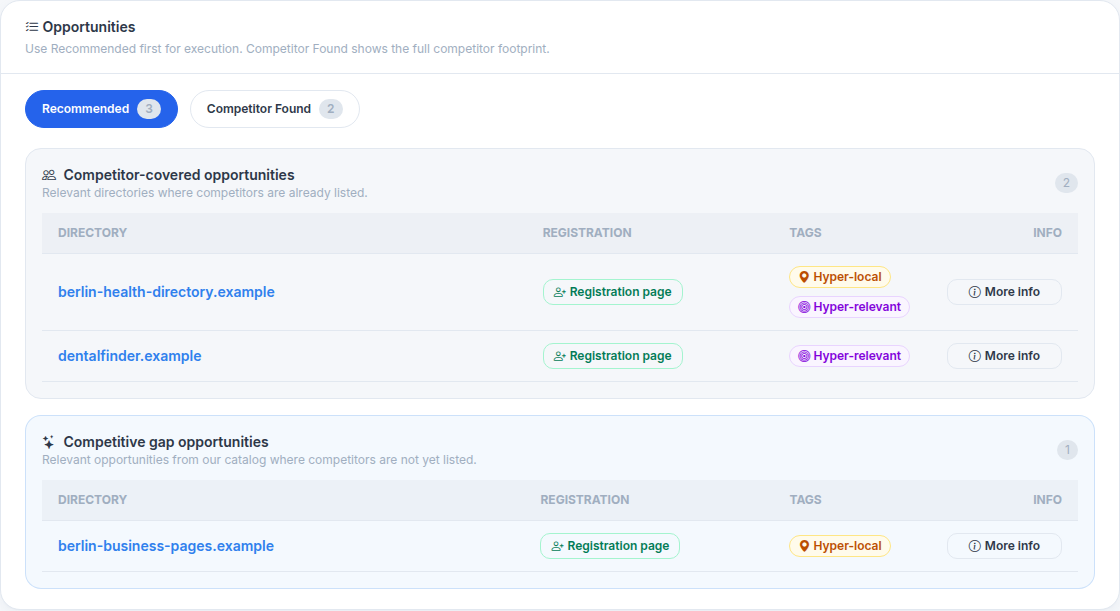
After completion, start with Recommended. It contains the best targets for execution, including competitor-covered opportunities and additional competitive gaps.
- Directory: The platform or domain to review.
- Registration: Direct path to the submission page when available.
- Tags: Local or niche fit signals that explain why the opportunity matters.
Export the run when you need a handoff
Use CSV for a simple execution sheet, or JSON when you need the full structured payload with scores, signals, and registration metadata.

How to interpret the two tabs
Recommended
The practical action list. Use it for outreach, manual submissions, or passing targets to Citation Blaster.
Competitor Found
The evidence view. Use it to understand which directories were found in competitor footprints.